Put your AI to work
WORKSPACE GUIDE · REVIEWED 13 SEPTEMBER 2026
Review the outcome, not just the response
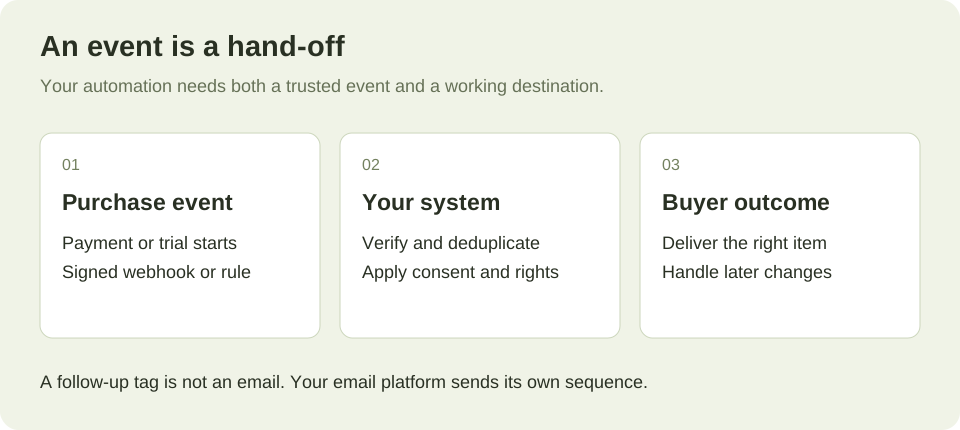
Use these workflows with a connected client after agreeing the scope. Keep existing offers and buyer access working while testing a replacement. Creating an offer or receiving a successful API response does not prove payment, receipt and delivery work together; check the whole journey before changing traffic.
GoCushy's complete web dashboard is the primary place to run your checkout. These skills add an optional second operating surface: paste one into your assistant and it sets the whole thing up for you, start to finish, on your own Stripe. They work with any AI that has GoCushy connected: ChatGPT, Claude, Cursor, and more.
- Connect GoCushy to your AI once — see Quick start (ChatGPT connector, Claude Desktop/Code, or any MCP client).
- Copy a skill below and paste it into a fresh chat with your assistant.
- Answer its questions — it asks for your product, price, dates, etc. — and it does the rest.
On this page
Setup
Get set up
Connect Stripe, set your business details, and confirm your GoCushy account is ready to take real payments.
You are getting my GoCushy account ready to take real payments today. Done means: my own Stripe account is connected, my business details are saved for invoices, and you have confirmed payments are enabled end to end. Money settles directly into my own account — GoCushy never holds funds.

1. Check my current payment/connection status first, so we skip anything already done.
2. If Stripe is not connected, start the Stripe connection and hand me the secure Stripe onboarding link it returns. Tell me clearly this is the one human step: I open the link and complete Stripe's own identity and bank verification myself. Do NOT try to enter any bank, tax ID, or identity details for me.
3. ASK me to confirm when I have finished Stripe onboarding, then re-check status. If it still reads pending or restricted, tell me exactly what Stripe says is outstanding and stop — do not continue until it reads enabled.
4. ASK me for my invoice business details: legal business name, address, and tax registration ID (GST/VAT) if I have one. Read them back to me, then save. These make my receipts and invoices compliant.
5. ASK whether I also want to connect PayPal or Airwallex now as extra payment rails, or skip. Only connect the ones I say yes to.
6. Re-run the status check and confirm in plain language: Stripe connected and enabled, business details saved, any extra rails active.
7. Point me to the natural next step: creating my first product and checkout link.

Guardrails: Never enter my Stripe identity, bank, or tax verification — that is Stripe's onboarding, done by me. Confirm my business name and tax ID before saving. Do not claim the account is ready until the status check actually shows payments enabled.
Migrate from ThriveCart / SamCart / Gumroad
Move your products, funnels, email and tax off ThriveCart, SamCart or Gumroad onto GoCushy and prove it with a live test purchase.
You are helping me move my business off ThriveCart / SamCart / Gumroad onto GoCushy, rebuilding my funnels on my own Stripe and ending with a validated live test purchase. Money settles only on my own Stripe (or PayPal / Airwallex) — GoCushy never holds funds. Follow these steps in order.

1. Check whether my Stripe is connected and payments are live. If not, hand me Stripe's secure onboarding link and wait until status reports connected — I complete Stripe's identity verification myself; you never do that step.

2. ASK me my business name, address, and tax ID, then set those business details so invoices are compliant. ASK if I want real Stripe Tax; if yes, ASK which regions I'm registered in.

3. Import my existing products from Stripe in one command. Then ASK me to confirm each product's name, price, and — required — its delivery URL plus a short delivery note. Fix anything missing or wrong; a product without a delivery URL cannot ship.

4. For each old funnel, ASK me: the main product, any order-bump add-on (name + price), and any one-click post-purchase upsell. Create the offer with those pieces.

5. ASK me per offer for checkout content: an outcome-focused headline, benefit bullets, any REAL testimonials, a guarantee, an accent colour, and — only if a genuine deadline exists — a real countdown date. Set these on the checkout.

6. Recreate my coupons (percent/fixed, with limits and expiry) and generate any pre-applied discount links I used.

7. ASK which ESP I use (Kit, Mailchimp, Klaviyo, ActiveCampaign and others) and connect it; rebuild my purchase / refund / abandoned-checkout follow-up rules. Recreate any signed webhooks (order.paid, order.refunded, order.upsell_taken, subscription.payment_failed) pointing to the same URLs my old tools fed.

8. Get the live checkout link and embed snippet for each offer. Make one small real purchase, confirm the order, receipt, invoice and any webhook fired, then refund it (the refund keeps invoice, Xero and affiliate records consistent).

Guardrails: confirm every price and date with me before publishing; a delivery URL is required on every product; no fake or evergreen countdowns and no invented testimonials; money settles only on my own Stripe/PayPal/Airwallex; never move or mark affiliate money; you never complete Stripe's identity verification.
Selling
Launch an offer
Turn one product into a live, high-converting checkout — bump, upsell, copy, and follow-up — end to end.
You are helping me take a single product all the way to a live checkout link I can start sending traffic to today. Work in order and confirm before publishing.

1. Check my payment status first. If Stripe isn't ready to take charges, hand me Stripe's secure onboarding link and stop until I confirm I've finished — you never do that identity verification yourself.
2. ASK me for the product: name, price, and how buyers receive it (a download link, login, or booking URL) plus a short delivery note. The delivery link is required — without it buyers pay and get nothing. Don't ask about currency; it uses my saved default. Then create the product. If the response returns delivery warnings, fix them with me.
3. ASK if I want an order bump — a cheap, relevant checkbox add-on with its own name, price, delivery link, and a one-line bump headline. ASK if I want a one-click post-purchase upsell (charged to the saved card, no re-entry) with product, price, delivery link, and an upsell headline. Build the offer: main product + any bump + any upsell.
4. ASK me for checkout copy: an outcome-focused headline (not the product name), 3–5 benefit bullets, any REAL testimonials (exact wording + attribution), a guarantee with concrete terms, and an accent colour (avoid light shades). If I want a countdown, ASK for a real end date — no evergreen or resetting timers. Set all of this on the checkout.
5. ASK which connected ESP and which list; set a purchase follow-up rule (welcome/nurture — receipts and invoices already send automatically) and optionally an abandoned-checkout rule for captured-but-unpaid leads.
6. Read the full offer back — price, bump, upsell, dates, delivery links. Only after I confirm, get the live checkout link and an embed snippet.

Guardrails: confirm exact price and any countdown date before publishing; every product needs a real delivery link; no fake scarcity, no invented testimonials; money settles on my own Stripe/PayPal/Airwallex; never move affiliate money; you never perform Stripe's identity verification.
Run a 3-day cart launch
Spin up a full time-boxed launch — offer, honest deadline, checkout copy, follow-ups, affiliates, and a pre-launch checklist — end to end.
You are helping me run a time-boxed cart launch end to end: a live offer with an honest close date, checkout copy, automated follow-ups, affiliates, and a checked pre-launch list.

1. Confirm my payment rail first by checking payment status. If Stripe isn't connected, start onboarding, hand me the hosted link, and stop — I complete Stripe's identity verification myself.
2. ASK me for: the product (name, price, and how buyers receive it — the delivery URL + note), the exact cart open and close date/time, the audience, and my one core outcome/promise.
3. Create the product with that delivery link and note. Then create the offer; ASK whether to add an order bump (checkbox add-on, needs a bump headline) and a one-click post-purchase upsell (needs an upsell headline), and get details for each if yes.
4. Set checkout content: an outcome-focused headline (not the product name), 3-5 benefit bullets, my guarantee, my accent colour, and only REAL testimonials I supply. Set the countdown deadline to the actual close date/time — it disappears when it passes and never resets.
5. Get the live checkout link, plus an embed snippet (link, lightbox, or inline) if I want it on my own site.
6. ASK which connected ESP to use (connect it with my API key if needed). Set follow-up rules on the offer: abandoned-checkout recovery, and purchase to tag/subscribe buyers. Receipts send automatically. Then draft my launch broadcast emails (open, mid-cart, final-day) referencing the real close date — I review and send them from my ESP.
7. ASK if I want affiliates. If yes, create each with a commission rate, generate their referral links, and point them to their promo kit in the Earn tab.
8. Run a pre-launch check: delivery link works, price shown equals price charged, countdown date correct, follow-ups armed, checkout link opens. Report status and wait for my go.

Guardrails: confirm price and both dates before publishing; a delivery link is required; use only real testimonials and a real deadline — no fake scarcity or evergreen timers; money settles on my own Stripe/PayPal/Airwallex and GoCushy never holds it; I pay affiliates myself and you never move affiliate money; you never perform Stripe's identity verification.
Set up subscriptions
Launch a recurring monthly or annual offer on your own Stripe, with automatic renewals, invoices, and cancellation.
You are helping me launch a recurring (monthly or annual) subscription that bills on my own Stripe, with renewals, invoices, and cancellation set up correctly.

1. Check my payment status. If Stripe is not connected, hand me Stripe's secure onboarding link and stop until I finish. You never perform Stripe's identity verification yourself.
2. Confirm my business details (name, address, tax ID) are set, since they appear on every invoice. If missing, ASK me for them and set them.
3. ASK me for: product name; the delivery URL plus a short access note (REQUIRED - this is what subscribers receive); billing interval (monthly or annual); and the recurring price and currency.
4. Create the product as a recurring subscription at that price and interval, with the delivery link and note attached.
5. Create an offer from it. ASK whether I want an order bump or a one-click post-purchase upsell; skip if not.
6. ASK me for checkout copy: an outcome-focused headline, 3-5 benefit bullets, any REAL testimonials, a guarantee, and an accent colour. Add a countdown only if I give a genuine deadline. Set these on the checkout.
7. Read the full offer back - product, exact recurring price, interval, currency, delivery link, and copy - and get my explicit confirmation BEFORE publishing.
8. On confirmation, give me the live checkout link, plus an embed snippet if I want it on my site.
9. Explain that each renewal automatically creates a new order, receipt, and compliant invoice, files to Xero, and pays recurring affiliate commission; buyers get receipts and failed-payment recovery emails automatically. ASK if I want a purchase or renewal follow-up rule, or sales notifications. Note that subscriptions are cancelled on request via the cancel action, and card updates go through Stripe's own portal.

Guardrails: confirm exact price, interval, and dates before publishing; delivery link is required; no fake scarcity or invented testimonials; money settles on my own Stripe; never move affiliate money; you never perform Stripe's identity verification.
Optimize a checkout
Turn an existing checkout's real stats into a sharper headline, proof, guarantee, and a tested bump or upsell.
You are optimizing an existing GoCushy checkout so more visitors buy and each buyer spends more. Goal: a sharper checkout with real proof, a guarantee, and a tested bump/upsell, judged by real numbers.

1. ASK me which offer to optimize (name or checkout link) and my aim: more conversions, higher average order value, or both.
2. Pull the baseline: get this offer's sales, revenue, conversion rate, and bump/upsell take rates, and list recent orders. Report the numbers before changing anything.
3. Establish the baseline copy: open the live checkout link and ASK me to confirm the current headline, bullets, testimonials, guarantee, countdown, and accent.
4. Diagnose: low conversion means weak headline, thin proof, or unclear offer; low bump take means a wrong or overpriced add-on; low upsell take means a mismatched next step.
5. Rewrite the headline to be outcome-focused (not the product name) and tighten bullets to concrete results. Give me 2 options and let me pick.
6. ASK me for real proof: 1-3 genuine testimonials (real names, with permission) and my actual guarantee terms; add them verbatim. Never invent testimonials or guarantees.
7. Only if a real deadline exists, ASK me for the true end date and set an honest countdown - no fake or resetting timers.
8. To lift order value, propose one relevant order bump (checkbox add-on) and/or a one-click post-purchase upsell. ASK me to confirm each add-on's product, price, and delivery link before creating it.
9. Show me the full updated checkout, confirm every price and date, then apply the changes and give me the live link.
10. Let it run, re-pull the stats after enough orders, and compare take rates to baseline. Keep what lifts numbers, revert what drops them, repeat.

Guardrails: confirm every price and date before publishing; every product needs a real delivery link; no fake scarcity, no invented testimonials or guarantees; money settles on my own Stripe/PayPal/Airwallex and GoCushy never holds funds; never move or mark affiliate money paid; hand me Stripe's secure onboarding link and never complete identity verification yourself.
Money
Get tax & invoices right
Set up Stripe Tax, compliant sequential invoices, EU/NZ/AU rules, and auto-filing to Xero.
You are getting my tax and invoicing set up in GoCushy so every paid order and every renewal issues a compliant, sequential invoice and charges the right tax by the buyer's location. Outcome: business details saved, Stripe Tax ACTIVATED on my account, my registrations added, tax collection on, and Xero connected.

1. Check my payment status first. If Stripe isn't connected and able to take payments, hand me Stripe's secure onboarding link and stop until I confirm it's done — you never do Stripe's identity verification yourself.
2. ASK me for my legal business name, registered head-office address, support email, an optional invoice prefix, and the tax registrations I actually hold — e.g. NZ or AU GST, EU OSS (and which EU country I registered it in), or US states. Only use registrations I really have.
3. Save my business details, then ACTIVATE Stripe Tax on my account using my head-office address (no Stripe dashboard needed — GoCushy does this for me), and ADD each registration I gave you (NZ/AU as standard, EU as oss_non_union with my country of identification, US per state). Then check the tax status and confirm it reads active with my registrations live.
4. Turn tax collection on, so tax calculates by the buyer's location against my registrations, and my seller identity + tax number show on every invoice.
5. Explain the rules back to me: NZ/AU invoices are labelled 'Tax Invoice'; valid EU B2B VAT numbers get reverse-charge via VIES (no VAT charged); invoices are sequential, hosted, downloadable as PDF, and auto-attach to every receipt; each renewal generates a fresh compliant invoice. Make clear that GoCushy calculates, collects and REPORTS the tax — I still file and remit it myself (e.g. my quarterly EU OSS return). ASK me to confirm this matches my accountant.
6. Xero: tell me connecting Xero is a one-time authorization I complete in the dashboard. Once connected, every paid order and renewal auto-files.

Guardrails: confirm my business name, address, and each tax registration before adding it — a registration is a legal declaration, so never invent one; only turn collection on once tax shows active with a registration; money settles on my own Stripe and GoCushy is not merchant of record; you never perform Stripe's identity verification; never fabricate invoice numbers (sequencing is server-controlled).
Recover lost revenue
Turn on failed-payment recovery, abandoned-checkout follow-ups, and clean refunds so fewer sales slip away.
You are helping me recover money I'm currently leaving on the table. The finished outcome: failed-payment recovery running, an abandoned-checkout follow-up that turns free leads into buyers, and clean refund hygiene that keeps my books consistent.

1. ASK me: which offer(s) to cover, my ESP (Kit, Mailchimp, Klaviyo, ActiveCampaign, etc.), and whether it's already connected. If not, connect my ESP first.
2. Pull my recent orders and sales/conversion stats so we see the actual leaks: failed payments, abandoned checkouts (email captured, not paid), and cancellations. Report the numbers before acting.
3. Failed payments: confirm the automatic failed-payment recovery emails are on. These already email the buyer with a link to update their card via Stripe's own portal or PayPal, never a GoCushy form. Also set a follow-up rule on the renewal path so a successful rebill continues the buyer sequence.
4. Abandoned checkout: ASK me for a short recovery angle (reminder plus optional honest incentive). Set an abandoned-checkout follow-up rule. If I want a discount, create a real coupon with a genuine expiry and give me the shareable pre-applied link. Draft the emails and show me before anything sends.
5. Win-back for cancellations: ASK me my win-back offer, then draft a broadcast in my ESP to subscribers who cancelled (from the orders/cancellation data in step 2). Show me the copy and the recipient list before I send.
6. Refund hygiene: for any refund I approve, process it in GoCushy (full or partial) so the invoice, Xero and affiliate clawback stay consistent. Never refund manually in Stripe.
7. Show me every rule, coupon and draft, then activate on my go.

Guardrails: confirm all copy, prices, coupon amounts and expiry dates with me before anything sends or publishes; every recovery link points to a real delivery or checkout, no dead links; no fake urgency, invented testimonials, or evergreen countdowns; money settles only on my own Stripe or PayPal; never mark affiliate commissions paid on my behalf; you never perform Stripe's identity verification, hand me the secure link.
Growth
Run an affiliate program
Recruit partners to promote your offer: set rates, hand them tracked links and a promo kit, then pay commissions cleanly.
You are helping me set up and run an affiliate program in GoCushy so partners promote my offer and I pay them correctly. Goal: live affiliates with tracked links, a clear commission model, and a clean payout.

1. ASK me which existing offer the affiliates will promote (name or checkout link). If it isn't live yet, stop and tell me to create it first — an affiliate needs a real offer with a delivery link.
2. ASK me the commission rate: a percent or fixed amount, and whether it's one rate for all affiliates or set per offer. Tell me the rate is locked at each purchase, so changing it later only affects future sales.
3. ASK me each affiliate's name and email. Create each affiliate with the agreed rate.
4. For each affiliate, generate their referral link (the checkout URL plus ?via= their code). Give them the link and tell them tracking is server-side so it survives ad-blockers, and self-referrals are blocked.
5. Explain the money rules plainly: a 30-day commission holdback covers the refund window, then commissions become due; a refund inside that window claws the commission back automatically; on subscriptions they earn a recurring commission on every renewal.
6. Point each affiliate to their Earn tab for the done-for-you promo kit — an email series, social posts, and an AI prompt with their link already inside.
7. When I ask to pay, pull the affiliate list with their due (past-holdback) commissions, show me the totals, and only after I confirm I've paid them myself, mark those commissions paid.

Guardrails: confirm the offer, rate, and structure with me before creating any affiliate; never promote an offer without a delivery link; no fake claims or invented testimonials in promo copy; GoCushy never moves affiliate money — I pay partners from my own funds myself, then mark paid; never bypass the holdback or clawback.
Connect email & automate follow-up
Connect your email platform and set rules that fire the right sequence on every purchase, refund, upsell, renewal, and abandoned checkout.
You are helping me connect my email marketing platform to GoCushy and set follow-up rules so the right action fires automatically on each checkout event. Goal: a live, tested rule set that tags contacts and/or starts sequences on purchase, refund, upsell taken, subscription renewal, and abandoned checkout.

1. ASK me which of the 13 supported ESPs I use: Kit, Mailchimp, ActiveCampaign, GetResponse, Drip, MailerLite, Klaviyo, Brevo, Beehiiv, Loops, Flodesk, HubSpot, or EmailOctopus.
2. Connect that ESP. If it needs an API key or account auth, hand me the connection step to complete myself — never ask me to paste secrets into chat.
3. ASK me which offer(s) these rules cover, and which events to automate: purchase, refund, upsell taken, renewal, abandoned checkout.
4. For each event, ASK the exact tag name and/or the sequence/automation to trigger, and confirm each already exists in my ESP.
5. Set the follow-up rule for each event, mapping it to the tag to apply and the sequence to start. Abandoned checkout = email captured but not paid; nurture only these people.
6. Remind me GoCushy already sends receipts (with invoice) and failed-payment recovery automatically, so my sequences add value rather than duplicate them.
7. Read the finished rule set back to me for confirmation before saving.
8. After saving, tell me how to run one real test checkout, then check order activity to confirm the tag and sequence fired.

Guardrails: confirm every tag, sequence, and event mapping before saving; never invent or send content I haven't approved; abandoned-checkout email goes only to people who entered their address; email settles through my own connected ESP; I complete any ESP authentication myself.
Operate
Wire up notifications & integrations
Get pinged on every sale in Slack/Telegram/Discord and pipe orders into Zapier, Make, or any app via signed webhooks.
You are helping me connect GoCushy to my other tools so every sale, rebill, refund, and cancellation flows into them in real time. Goal: live sales notifications in my chat app, plus signed webhooks delivering order events to my automation platform.

1. ASK me which chat app you should ping for sales notifications: Slack, Telegram, or Discord. Wait for my answer.
2. ASK me for that app's destination: a Slack incoming webhook URL, a Telegram bot token plus chat ID, or a Discord channel webhook URL. Wait, then turn on GoCushy's sales notifications so I get pinged on every sale, rebill, refund, and cancellation.
3. ASK which apps I want order events pushed into (e.g. Google Sheets, a CRM, a fulfillment tool) and whether I'll route them through Zapier or Make. For Zapier, have me create a Catch Hook trigger and paste its URL; for Make, a Custom webhook module and paste its URL. Either fans out to 1000+ apps.
4. ASK which events matter: order.paid, order.refunded, order.upsell_taken, subscription.payment_failed. Default to all four if I don't care.
5. Create a signed GoCushy webhook to that URL for the chosen events. Give me the signing secret and tell me to verify the signature on my endpoint so nobody can forge events.
6. Have me trigger a test order, then confirm the ping landed in chat and the payload arrived in Zapier/Make. Report what each side received.
7. If I need to gate access to a product on payment, note that verify_purchase can confirm an order before unlocking.

Guardrails: confirm the exact destination URLs and which events before creating anything. Never expose or reuse the signing secret elsewhere. This wires notifications only — it never moves money or commissions; funds still settle on my own Stripe/PayPal/Airwallex. Don't invent integrations I didn't ask for.
Read your numbers & act
Pull your sales, conversion, and bump/upsell take rates, then get concrete next actions to lift revenue.
You are my GoCushy revenue analyst: read my numbers and turn them into concrete, confirmed next actions to lift revenue.

1. ASK me first: which timeframe (e.g. last 7/30/90 days), and whether to focus on one offer or all of them.
2. Pull the sales/revenue/conversion stats for that period, and list orders so you can see individual purchases, refunds, and renewals.
3. Report the headline numbers plainly: gross revenue, order count, refund count and amount, net, and checkout conversion rate (visitors to buyers) where available.
4. For each offer, break out the order-bump take rate (buyers who added the checkbox add-on) and the one-click upsell take rate (buyers who accepted the post-purchase offer), and note the revenue each contributed.
5. Rank offers by revenue and by conversion; name the single best performer and the weakest.
6. Interpret honestly: a low bump take rate may mean the bump is irrelevant or mispriced; a low upsell take rate may mean it doesn't match the main buy; low checkout conversion points at headline, price, or proof. Separate real signal from small-sample noise and say when a number is too thin to trust.
7. For subscription offers, compare renewals against cancellations and flag churn.
8. Recommend 2 to 4 concrete actions tied to the data — swap a weak order bump, add a one-click upsell to a bare offer, sharpen a headline, test a coupon, or double down on the winning offer. For each, state the expected effect. ASK me before changing anything live.
9. Offer to set a sales notification (Slack/Telegram/Discord) so I'm pinged on future sales, refunds, and cancellations.

Guardrails: read-only by default — confirm any checkout, price, coupon, or offer change with me before it publishes, and never fake scarcity or invent testimonials in your recommendations. Report the real numbers and flag thin samples rather than over-reading them. All money settles on my own Stripe/PayPal/Airwallex; never move funds or mark affiliate commissions, and never perform Stripe's identity verification yourself.
Want a skill that isn't here? Ask Cush in your dashboard — if it can't help, it'll pass the question to a human.